Update Salesforce Data Entry Source without stopping a Journey!
Problem Statement:
Until a few months ago, I hesitated to change the Salesforce entry sources for any Running Journeys because these were business-critical triggered messages that customers must receive.
This meant updating entry sources for production journeys during off-peak times such as late nights or early mornings (12am on a Saturday was for me🤢).

Journeys using Salesforce Entry Sources are notorious for testing, debugging and most importantly updates.
In this post, we will uncover how we update the Salesforce entry source for a running Journey without stopping it to avoid business disruptions - we will also explore its impact on Salesforce Flows.
How does Salesforce Data Event (SDE) work?
A Salesforce Data Event is an action in the Sales/Service Cloud, such as creating or updating an object record, that injects a contact into a Journey.
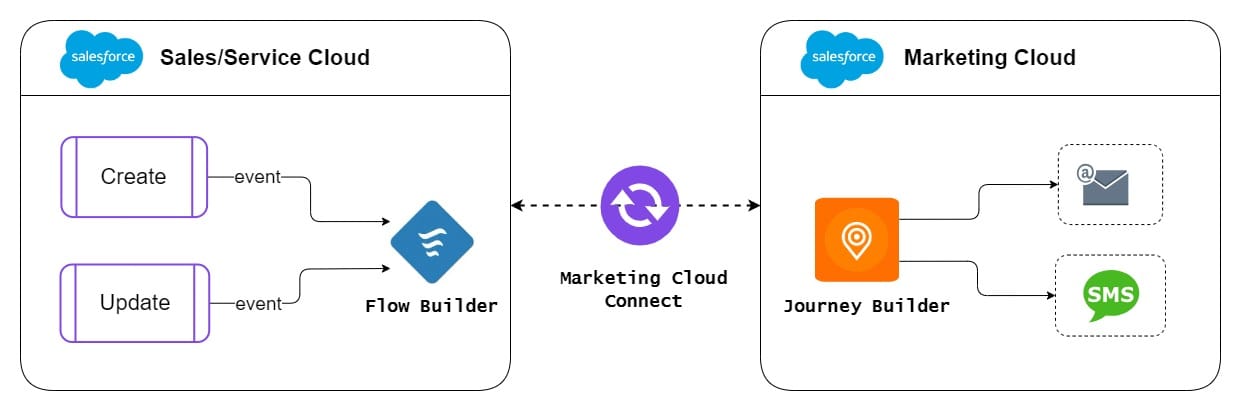
Users are building more triggered messages like new accounts/onboarding, order confirmations, payment failures, etc on Journey Builder due to the declarative configuration of the SF Entry sources.
🤓 Technical Outlook:
When an integrated Journey is activated, the Sales Cloud Flow Metadata API launches the flow for the object with the conditions specified in the entry configuration which creates/updates the Salesforce Flow.

Flow Builder initiates a Journey Builder event when the primary object meets rule criteria and reference object filtering criteria.
true/false state; true being the entry+filter rule of the Salesforce Entry source and false the opposite. (comment below if you want a post on this)
👉 How to update the SF entry source without stopping the Journey?
Foremost, you should understand that a Journey using the SF Entry source depends on the Flow in the Sales/Service Cloud thus its Salesforce Entry Source isn't editable.
As per the Salesforce help page, “Salesforce entry sources are only editable when no other running Journey or version uses them”.
Simply by extrapolating this rule, the Salesforce Entry Source becomes editable when all versions of a Journey are paused.
Disclaimer: This is not an officially documented solution therefore, implement it at your risk.
🗺️ Let's take a look at the solution guide!
1️⃣ Pause and Configure
Foremost, you're required to pause all versions of the Journey by heading over to the most recent Running version.
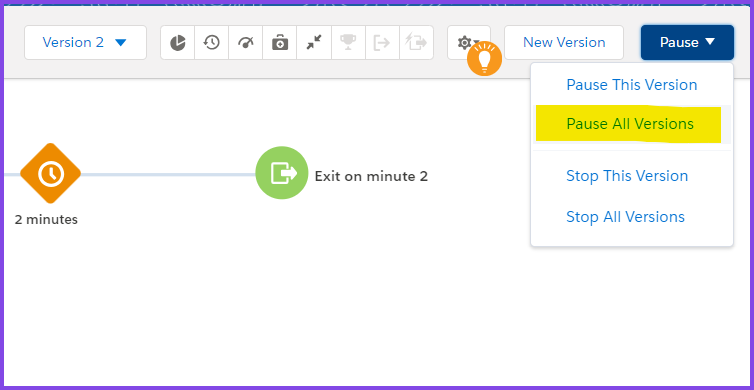
Pause Options be sure to select the Queue and process option as this allows the queue of any incoming triggered records from the Sales/Service Cloud during the Paused period.As a result, I have been able to update Journeys with SF Entry sources in the Production Org during operating hours without any disruptions.😌
Note: During the
Paused status, any queued records will be held and processed in the previous version of the Journey.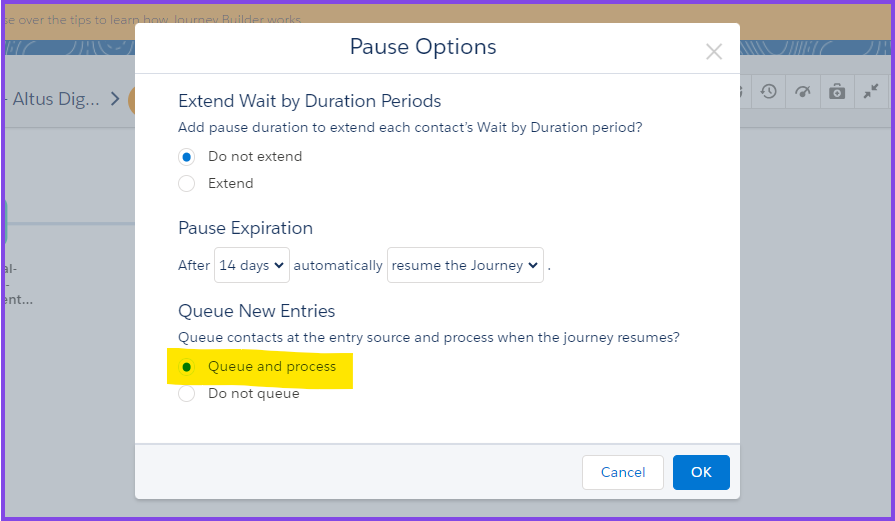
Note: It may take longer to pause all versions depending on the number of activities and versions of a Journey so be patient.
2️⃣ Update Entry Source and Activate
Once all versions are Paused, we will create a new version of the Journey to configure the Salesforce Entry Source with the new changes.

Hit Save and check your new changes within ENTRY CRITERIA Tab in the Salesforce Entry Source again to ensure the new changes are applied.
Note: If a Journey is configured with a Resusable Entry Source then you will need to apply the changes via the Events option in Journey Builder.

Then Validate and Activate the new version which results in a new version of Flow in Sales/Service Cloud.

Lastly, once the new version is in Running status, head over to the previous Paused version to Resume All Versions which will release any queued records that are qualified to enter the Journey or are mid-way through the Journey.
Verdict
In conclusion, updating Salesforce entry sources for live Journeys without disrupting business is quite a task and although this method isn't an officially documented process, it works!